Tuesday, June 29, 2010

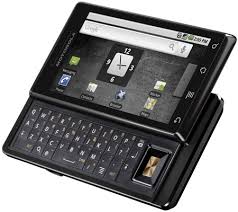
Tech Time: Motorola Milestone Review


Jamaicans hungering for an Android based smart phone will find, this is their summer. The quad band GSM Motorola Milestone launches in just a few short weeks.

The much hyped Motorola Milestone has several really cool, yet practical features:
  1. The Android 2.1 OS is the latest, fastest and most efficient version of Android, offering seamless integration with Google products including email and an advanced search feature that looks through contacts, content and the web simultaneously to help you find what you are looking for
  2. The brilliant 3.7’ touch screen supports multiple gestures including double tap and pinch for zoom with an intuitive haptic feedback feature and an ambient light aware display
  3. Two keyboards allow users to switch between a virtual on-screen keyboard and physical QWERTY keyboard revealed under a slim-line slider
  4. Dedicated keys for the most common functions including HOME, MENU, BACK, SEARCH, VOLUME and CAMERA
  5. A 5 MP camera with dual LED flash, built-in 4X digital zoom, auto-focus and 720x480 DVD quality video recording which you can upload straight to YouTube
  6. Multiple wireless connectivity options including 3G, WiFi, Bluetooth® and GPS

Many refer to the Milestone as an iPhone killer, and what of Blackberry? The Milestone’s metal casing gives the phone a sturdy, but heavy feel tipping the scales at 6 oz as compared to less than 5 oz for most Blackberry and iPhone models. The Android Market is expanding like none other leaving the Blackberry Appworld in the dust and providing serious competition to the leading iTunes Store.

Like the iPhone, the Milestone can download and play customised ringtones in multiple formats including, most significantly, iTunes AAC files. Both phones have accelerometers.

Unlike the iPhone, Milestones haptic response and micro SD expansion slot (supporting up to 32 GB) make the device user friendly even if you need to keep your charger close to use it.

As the tagline suggests, Motorola Milestone offers little compromise. BBM may force me to hold on to my Blackberry, but my iPhone may get dusty if I hit this Milestone.


Windows 7 Tip: Windows 7 now provides a standard way to switch your display from one monitor to another, or a projector - just press Win+P and choose your preferred display. (This will have no effect if you've only one display connected.) Get more tips.


Interface with us:
On email: famefm@rjrgroup.com
On SMS: 876-878-FAME (18768783263)

Saturday, June 26, 2010

Tech: IT Easy - Say Cheese! Taking the perfect phone pic (with or without a wig)


Sometimes you just wish you had a camera ... you just wish you could capture that remarkable moment and share it with the world. You can. Don't have a camera? You can. 'Cause, chances are, your mobile phone has a camera.

No, you don't need the latest smartphone or high-end cellular for great mobile-phone pics. You just need to follow a few simple principles to get that shot that everyone will be talking about tomorrow.

First rule, LIGHT. Really, you need to get your subject in the light. Natural sunlight is best, but artificial light may be all you have. The flash on your phone has very limited power and range, so it should never be your first choice when it comes to lighting.

Friday, June 18, 2010

Star Tech: IT Easy - Leetspeak and textese emerging as dialects


In a country where we already have our very own dialect, the introduction of leetspeak and textese may prove confusing. The good thing is, like English, these new 'dialects' have rules and exceptions we can learn and follow. And learn we must, if we want to keep up with the times.

The clashing of three factors led to the rise of textese - the explosion in the popularity of SMS, the initial scarcity of a QWERTY keyboard and the arbitrary 140-character limit. New words, alternate spellings, phonetic replacements, vowel omissions, acronyms and abbreviations are all significant components of textese.

Somewhat less well known is leetspeak. Leetspeak was the language of hackers, today leetspeak is creeping into casual communications; tomorrow, leetspeak will be commonplace. Unlike textese that is primarily concerned with brevity, leetspeak is designed to puzzle. Digits, characters, punctuation marks and even other letters are used to replace the original spellings in words that require some extra effort to read. Complicating matters, there are no hard and fast rules for how the substitutions are applied; the writer has complete control over how they wish to present their work.


Wednesday, June 16, 2010

Tech Time: Software - Browsers

Regardless of the platform you are working on, PC, Mac or Linux, your browser is your “window to the internet”. Browsers have come a long way from the popular Netscape, which ushered in a new era of graphical Internet interfacing. Today’s browsers are used for more than just research; shopping, banking, communication, entertainment and more recently productivity are all now core functions of the browser.

There are a lot of browser options out there, and best of all, their FREE! Firefox, Chrome, Internet Explorer (IE), Opera and Safari dominate the field with now common features like tabbed browsing, thumb nail previews, RSS feeds, customisable skins, widgets and add-ons.
Generally, browsers are easy to use and have built in search engine capabilities. This means, all you really need to do, is enter a keyword in the address bar and the browser will figure out the exact address, the site you visited previously or bring up several options for you choose from based on the keyword entered.

Private browsing and cookie management are critical for modern browsers, giving users the power to control how much personal information about them is available online.

Though many Browsers boast similar features, they occasionally display pages differently and provide different levels of security. Like your anti-virus software, your browser should always be up-to-date with the latest version to prevent pop-ups, viruses, spy ware and phishing threats that may result from security holes.

Windows 7 Tip: Right-click an empty part of the desktop, select Personalise > Desktop Background, then hold down Ctrl as you click on the images you like. Choose how often you'd like the images to be changed (anything from daily to once every 10 seconds), select Shuffle if you'd like the backgrounds to appear in a random order, then click Save Changes and enjoy the show.


Interface with us:
On email: famefm@rjrgroup.com
On SMS: 876-878-FAME (18768783263)

Friday, June 11, 2010

Star Tech: IT Easy - Hello? Who dat? Simple phone etiquette


Welcome to the world of mobile phones. As mobile phones become less expensive and more accessible, Jamaicans are becoming less concerned about the proper way to use the phone. Basic courtesies, and some new ones, apply to mobile-phone usage.

Let's start with making a call. Unless you are calling a friend or calling in an emergency, there is not likely to be a business reason to call someone before 6 a.m. Check the number before you dial, then check it again. Dialling the wrong number is a waste of money and annoying. Of course, everyone makes mistakes; if you make this one, politely let the person know before hanging up - don't just hang up in their ear.


Tuesday, June 8, 2010

Tech Time: Software - Mobile Apps

The mobile app explosion has birthed a whole new glut of software for our favourite mobile device, popularly (yet inaccurately) referred to as phones. Though Blackberry, iPhone, Windows Mobile and promising upstart Android claim the heap as the most prolific mobile phone platforms, there are several other good platforms, which we can’t explore due to space and time limitations.

For Crackberry addicts an exploration into apps starts with Blackberry Appworld, for iPhone fanboys, the search for apps starts with iTunes.

That said, all mobile phone users may want to consider adding the Opera browser to their device. Apps for Facebook, Twitter, MySpace, document viewers, music streaming apps such as Pandora, Slacker Radio and Last.fm are popular across all platforms and really, can be considered a requirement for the truly mobile savvy. Other cool, multi-platform apps include World Mate Live, Dictionay.com, UberTwitter and Tweetdeck.

Android devices have an ever increasing pool of apps to choose from, including Voice Recorder, Twidroi, Shazam and Sound Hound, all of which top the cool meter.

iPhone is becoming a serious handheld game console, rivaling the dominance of the Nintendo DS series and PSP incarnations thanks to the introduction of hot titles like Guitar Hero, Angry Birds, Call of Duty, ESPN 2010 FIFA, Tetris and Sims 3.

Windows Mobile stands out by being one of the few platforms that support Skype, with new phones on the market making use of Windows Mobile, we can expect to have more apps from which to choose.

Windows 7 Tip: Press and hold the Windows key and the space bar to make every active window transparent and reveal your desktop. Release the Windows key to return to the previous view.


Interface with us:
On email: famefm@rjrgroup.com
On SMS: 876-878-FAME (18768783263)

Friday, June 4, 2010

Star Tech: IT Easy - Antisocial social networking - Protecting Yourself Online


Let's face it. In today's world, we all have a 'digital footprint' - little bits of information about ourselves all over the Internet. Realistically, there is no way to prevent this, but we can control what we put out there and limit who has access to it.

Social networking sites are great fun but also great dangers. Posted pictures, videos and status updates can be viewed by friends and fiends alike. Unless you take a few simple steps to protect yourself.

Setting a good password is the first step. Easy for you to remember may be easy for someone else to guess, so stay away from tired options like children's names or birthdays. Instead, choose an obscure word that you are likely to remember, and then mix it up, literally. Use mixed case letters and numbers within the word. Take it further, by changing your password every three months or so.

Voicemail's Praise His Name

Praise His Name
Written by: Kevin Blair, O’Neil Edwards, Jerome “Craig” Jackson


Prayer
To my creator
I will praise the Lord at all times
His praise will always be on my lips
My soul will boast in the Lord
Glorify the Lord with me
And let us exalt his name together

Verse 1
Before I close my eyes I give him thanks
And when I rise I give him praise
He is the source of my energy, source of my peace
So many times I lift my hands to him and say thank you
So many times I feel him next to me, I

Chorus:
So I raise his name, up high
I will praise his name, yes I
Will praise his name

Verse 2
I won’t wait until my back is against the wall, before I call
He’s always there to catch me when I fall, and when it gets hard, he’s there
He is there to keep me safe and keep me warm, when life gets cold
He is there to shelter me when I am alone

Chorus

Verse 3
So in my going out and in my coming in
We have to give praise to one who died for we sins
No matter what the time, place or what it is
He’s always there to grant me my wishes
Father God, him understand all problems
Just put it to him and trust me he will solve them
‘Cause he is the giver of life
He will make sure everything’s all right

Verse 4
For God so loved the world, he gave his only son
That whosever believed, shall live forever more
And you, and me, shall live eternally
And you, and I, shall live happy and free

Chorus

Tuesday, June 1, 2010

Tech Time: Software – Personal Finance

Great personal finance software can transform our lives! Hmm, ok may, maybe that is an overstatement, but personal finance software can help us track our income, spending, savings and debts providing insights to help us make smart decisions about our money.

Above all, personal finance software should be user friendly with intuitive features. Software should also have built-in calculators and tools to help plan retirement, large purchases, taxes and debt management. Reports, charts and graphs features provide powerful analysis tools for informed decision making.

Unfortunately, the best available commercially available doesn’t offer Jamaicans some of the greatest advantages such as integrated online banking and tax preparation – thankfully they are still robust enough to be practical. Quicken is by far, considered to be the best personal management software available. It costs roughly US$40.00. In a perfect world, in addition to tracking income and expenses, Quicken syncs seamlessly with your bank accounts for electronic bill payments and account reconciliation and has the most up-to-date tax information to facilitate the preparation of tax returns.

Using the cloud, Quicken allows you to move from your PC to your mobile phone without missing a beat. Quicken has a dedicated iPhone app, sorry Blackberry and Android users.
If the US$40 price tag is too much, Mint.com offers a free option. Mint is completely cloud based and is available for Android in addition to iPhone, but for Jamaicans, features the same non-bank/tax integration.

Blackberry users hell bent on mobile personal finance can check out Ascendo Money and Splash Money with desktop support for about US$40.00 each.

Windows 7 Tip: Jump lists are a new feature that give you the option to view a list recently accessed files by applications, even when the application isn’t open, by right-clicking on the application’s icon in the task bar.

Be safe and dry this hurricane season!

Interface with us:
On email: famefm@rjrgroup.com
On SMS: 876-878-FAME (18768783263)