Showing posts with label secure. Show all posts

Wednesday, October 24, 2018

Protect Your Digital Self: Tech Brawta

It’s a mad, mad, mad, mad world.

Until that changes, and I strongly recommend no breath holding, we have to take the securing to our digital identity into our own hands.

There is no foolproof way to protect our digital identity, but every step towards tighter security is a step further away from digital danger.  So, let’s take a few steps together.

Step 1:  Strong, Unique Passwords

By now, you’ve heard it a million times, but it is clear that some of us, including Kayne West, simply do not listen.  Having a strong, unique password for every account and every device is both necessary and effective.

I no longer expect you to remember every password.  I expect you to use a good password manager like Last Pass or 1Password.  If you’re a Mac, consider using Keychain.  Each of these options will help you create long and complex passwords, keep track of account login information, and add an extra layer of protection for your data.

Step 2: Turn On 2FA

Two Factor Authentication requires you to use a secondary, separate verification method to access your account.  Often, an access code is generated by, or sent to, your mobile phone.  Alternately you may have a dedicated physical device, often called a token.  There are even further options.

Regardless of the 2FA methodology, the short version is, it makes it harder for bad guys to get into your account because it is less likely that they would have both your password and access to your secondary authentication method.

Step 3: Use a Secondary Email Account

Speaking of secondary, do not use your primary email for social media and other non-mission critical website or accounts.

Take the time to set up an alternate email address specifically for registrations.  This account would not be for friends and family, nor would it be for correspondence with your financial institutions.  This account would be exclusively for the ‘other stuff’.

Step 4: Keep Your Devices Updated

You don’t need the latest device, but you do need the latest Operating System (OS) and apps.  Developers are always on the hunt for bugs and vulnerabilities.  They fix these with updates.  Without updates, you may be leaving your system open to hackers.  Close up all possible loopholes by updating your OS, your anti-virus software, your firmware and your applications across all devices.

Step 5: Review and Refresh Settings

Something else developers do, change privacy policies, terms and settings.  Often, without telling you.

So, you may think your profile is private and unable to be shared with third parties, only to find out the hard way that six months after you took nearly an hour to perfectly tweak your privacy settings that the website you visited is using your clever content in a not so clever marketing campaign.

Put to stop to this, or at least try, by periodically reviewing your settings and refreshing where necessary.  Look closely to ensure you didn’t 'opt-in' to something you wish you’d never heard of. Double check to make sure that the privacy policies match your expectations.

These five steps are the first steps, to maintaining the credibility of your identity online.  Execute.  Repeat.


Tune in to @RJR94FM every Wednesday morning at 8:15 AM for #Tech4Life

Saturday, May 27, 2017

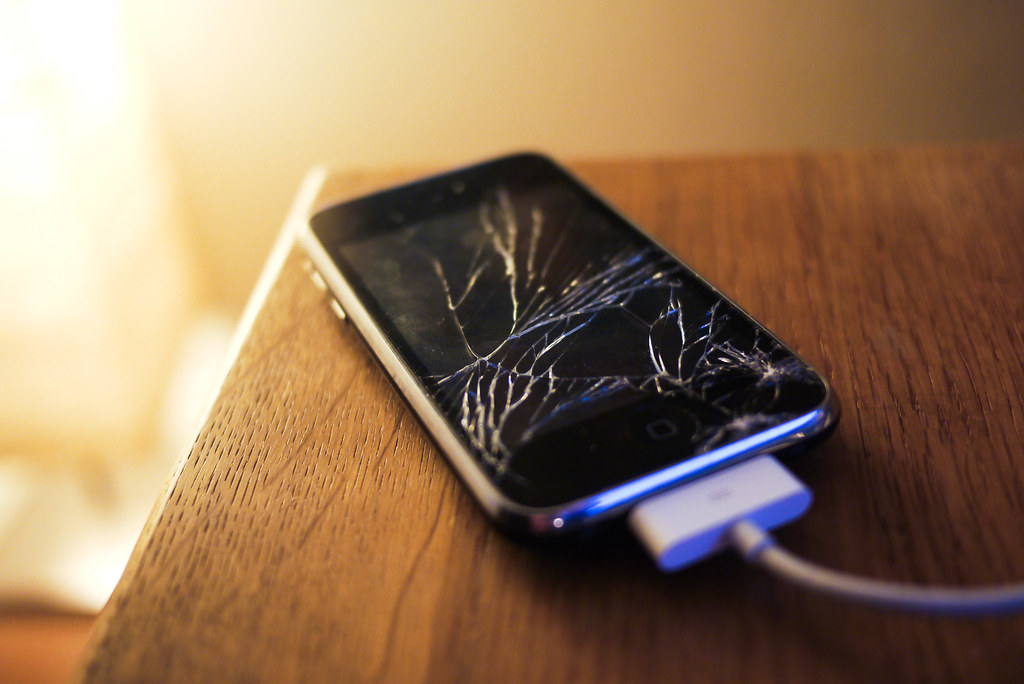
Handing Over Your Handset for Repairs? Do this first!

Almost everyone faces this challenge.  Your handset is wonky and in need of professional attention.  It’s time to take it to the repair shop to fix whatever’s gone wrong and you’re feeling justifiable anxiety.

What if they copy off my data?  What if they damage it further?  What if they install substitute parts?  What if they install malware?  While not all repair shops are unscrupulous, it is always best to take a few steps to add extra protection.

Step 1: Prepare

Prepare your smartphone by doing two things. First, un-encrypting the data.  That's right, remove the encryption security feature temporarily.  This will make it easier to move data to the cloud or another device.  Second, make a note of both the phone IMEI number and the battery serial number (if removable).

Step 2: Wipe After Backup

It may seem extreme, but the best way to protect your data is to not hand it over at all.  Leaving your password on offers some protection, but it can also prevent the repair technician from doing a thorough job or repairing and testing the phone.

Take a few moments to backup the handset to the cloud or a computer, ensure your data is retrievable and then proceed to wipe all settings and data.  In effect, what you are doing is a factory reset to make the phone like the day you bought it.

Step 3:  Remove the SIM & SD card

Protect your privacy by retaining your SIM card.  If the technician needs to make a test call, they should have a compatible SIM on hand expressly for this purpose.  Just be sure to let the technician know if your handset is locked to a specific network.

Similarly, pull out your micro SD card (if you’ve got one installed).  Chances are, you’ve got more than just precious pictures on the card.  Some smartphones save apps and critical data on the removable storage device in order to free up space on the unit.

If you forgot to unencrypt your card before removing it from a wiped handset, your data may be irretrievably lost.  That’s why it’s listed at Step 1; it’s important!

Step 4: Take Pics

Rope in a friend to assist by using their smartphone to take pictures of your smartphone.  Engage your ‘CSI’ self and take multiple pics from various angles including images of any damage, images of the internal components and clear images of the battery including the serial number where possible.

Step 5: Protective Packaging

Don’t transport your phone without protective packaging.  Break out the original box, if you still have it, or some bubble wrap, if handy.  You want to ensure that you don’t pick up any more bumps and scratches between when you transport it to the shop and when they return your repaired handset.

Step 6: Timestamp the receipt

Note the specific date and time your phone left your possession and keep this information with you.  Let’s hope your phone is returned in perfect condition in a short time.  If not, you made need your timestamped receipt to lodge a complaint.  Worse, you made need your receipt to prove that you had no access to your handset for a period of time.  The rest, I will leave to your imagination.


Once you've got your precious instrument back, check it thoroughly to ensure there are no new scratches.  Make sure it is your phone and battery by inspecting the IMIE and battery serial number.  Factory reset the phone one more time.  Install your SIM and micro SD card. Then restore from your backup.

Once you're up and running, it is time to encrypt your data for maximum protection.  Then back it up again.  You're ready to go.  Enjoy your repaired phone!


Wednesday, April 19, 2017

How to Protect Your Credit Card Online

In this day and age, the only way to be sure that your credit card is safe is to, not have one.  Of course, the practical consequence of not having a credit card means no online shopping, no convenient on the go purchases and no easy digital management of various expenses.

Even mobile payments are tied to credit cards with precious few options to avoid the ubiquitous payment method.

Since not having a credit card is not practical (for me at least), let’s look at some tips to add security in an unsure cyber world.

Do Use Secure Sites with HTTPS 

It goes without saying that you should only share your credit card information with trusted sites, but how do you know you can trust the site.  Well, one thing to look out for is a little lock icon in your browser representing the HTTPS; the ’s’ stands for secure (the HTTP means Hypertext Transfer Protocol if your interested).  Traffic on sites designated with the HTTPS is encrypted.

Reputable shopping sites like Amazon and even smaller shopping sites can make use of encryption to add another layer of protection to your personal financial information.  If, it ain’t got the ’s’, don’t drop the $.  Simple.

Do Monitor Statements 

Online shopping is so convenient.  So too, is checking your statement online.  And the two should never be separated.  Continuous monitoring of your transactions with a view to quickly identify and immediately report suspicious charges is a requirement of responsible online shopping practices.

If you consider even that too much, automate the process.  Have your credit card company text you after ever transaction and report any fraudulent transactions faster than a Lamborghini can do zero to 60 mph.

Do Use Unique Passwords

Sure.  It can be a pain to use a different password for every site.  But, it is necessary.  Even reputable businesses can be compromised putting your other accounts in danger.  Unique passwords can help stop hackers in their tracks and keep their nefarious actions at bay.

Develop a system to help you remember the passwords or use a password manager like 1Password or LastPass.  If you’re a Mac, consider the free, built-in, seamless iCloud KeyChain.

Regardless of which system you use, do immediately, if not already done, upgrade to two-factor authentication (2FA) on every account that offers the option.  2FA also adds an extra layer of security; in many cases when logging in, users have to enter a code issued via a text, an app or dedicated device, in addition to the correct password.


Do Secure Your Network

That “free” hotspot is tempting.  But nothing in life is truly free.  Many ask you to register your email address and then hit you with spam.  Some are not secure, deliberately or accidentally.  Tempting as it may be, use secure mobile data, a Wi-Fi analyzer to assess the network or a VPN (Virtual Private Network) to “scramble” your internet signals.

If you must jump on to a hotspot unprotected, avoid open networks (no password requirement), check with the proprietor to ensure the SSID is not being spoofed, light up a firewall, and limit your online traffic to the essentials.

Make sure your system OS (Operating System), software, apps, anti-virus and anti-malware are all up to date.

Do Consider Alternatives

PayPal and similar services put ‘distance’ between your credit card and the merchant.  Many credit card companies offer excellent alternatives like ‘disposable’ card numbers and secondary PIN verification for transactions.

Don’t Email/IM Credit Card Info

This advice has been repeated over and over and over again.  Yet we keep doing it.  Never, never send your credit card number, expiration date and/or CIS, your PIN or your password via an email message or instant message (IM).

Even if you think your email account is impenetrable (and it is not), the recipient's account could be compromised leaving you exposed.  It is just not worth it.

Don’t Auto Complete Card Numbers

Browsers, under the guise of being helpful, offer to auto-complete forms.  It’s a great idea for when you type your name, not so much when typing your credit card information.  Consider turning off this feature for all sensitive financial data and key in the numbers yourself.

In that same vein, don’t store your card information on the site.  Many sites encourage you to create accounts (with your card information) to make future transactions easier.  Don’t trade ease for security and opt, where possible, not to permanently hand over your account digits.

Don’t Respond to Suspect Email

This one is hard.  Phishing emails are becoming more sophisticated and more difficult to spot.  The email may appear to come from your bank, or your boss or your spouse and ask you to verify your information by clicking on a link.  There are countless other scenarios that appear legitimate but are not.  Don't assume the sender is who they say they are just because they have some information.

The bottom line, be VERY careful.  Pick up the phone and call your financial institution, go directly to the official website and avoid clicking on the link, update your virus protection systems, never auto download attachments and be very suspicious of almost everything.  Paranoid much?  Perhaps.  Protected? Definitely.

Don’t Withdraw Cash Unnecessarily

Aside from being hit with high fees for each withdrawal, you have to watch out for skimmers on ATMs, so the fewer trips to the ATM, the better.

Try to withdraw a little more cash than you immediately need, use your smartphone to make a video recording of the transaction, photograph and keep your receipt, only use well-lit ATM in high traffic/well-populated areas and inspect that machine before and after use.  This, along with vigilant monitoring of your online statements, should help reduce the incidences of fraud.

Sources:
Daily Telegraph
Bank of America

Tech4Life airs on @RJR94FM every Tuesday morning at 8:15 am

Wednesday, April 20, 2016

T4L: Amber Lit Up Expo Jamaica

AMB 365
If there were a Best In Show Award - Technology category and the immensely successful Expo Jamaica, Amber Connect would have won, hands down!

It was a small booth, tucked away in a corner.  You could have missed it.  Thankfully, I did not.

On show was Amber Connect’s Vehicle Tracker - little but Talawah.

So, like many other trackers, the devices (they have a range), track several vehicle metrics, including movement to provide security, enhance fuel efficiency and, quite frankly, rack up “cool” points with friends and family.

Once installed, you can track your car via the cross-platform app or web portal in real time.  Listen close, ‘cause this is important.  Amber’s real time is not every 15 minutes; Amber’s real time is every five seconds via an on-board data connection.  The one-year subscription included in the one-time installation fee translates to no monthly charges.

Amber can monitor fuel efficiency (or lack thereof) and provide actual mileage costs.  It can create safe zones for kids, employees or even for family members borrowing the car.  It offers remote shut off to cut off thieves (or rogue family members) in their tracks and remote start, an uncommon feature in similar systems.  Get speed alerts or device tamper alerts right from the unit to your mobile device or send a collision alarm to prescribed contacts in case of an accident.

The ultra-discrete device is not visible from the battery making it even harder to detect and harder to disable or remove.  The best part is, your reduced insurance premiums may just cover the full cost of the installation.  With that, Amber just got a green light.


Tech4Life airs every Wednesday morning at 8:15 am on @RJR94FM


Monday, March 14, 2016

Dare I Be Invisible?

I’ve thought about it.  Stepping off the grid and becoming completely invisible; online at least.

No identity theft.  No public shaming.  No big data marketing manipulation.  No government intrusion.  And yet still, no utopia.

Being invisible is not interchangeable with being private.  Even in this digital age, we can get up, stand up and fight for our right to privacy while still enjoying the spoils of a connected world.  Ready? Set. Fight!

Just as we would not walk down a dark alley without putting up our guard and tightening our awareness of our environment, we should not traverse the digital domain without consciously monitoring our actions.  To maintain our privacy, we must constantly analyze our browsing habits, social media interactions email practices, mobile use and our passwords to maintain our privacy.

Weak Spots

Let’s start with email.  Sure, instant message (IM) services and social media dominate cyber communications, but email is still the bedrock of the online world.  Phishing scams abound!  Be suspicious of password reset notifications (that you never initiated), requests for money or personal info and viruses as each of these can be an assault on your privacy.

Social media, by its very nature, is the antithesis of privacy.  'Social' is designed for interaction, for sharing, for connections.  Yet, this is the space we must be most vigilant in protecting our identity.  For some, it is easy to forget that chatting on the internet is like chatting with a friend at a bus stop; everyone within earshot can hear.  Even if personal data is exchanged in a Direct Message (DM) versus a feed/timeline, the data is “out there”, in a public space for the world to see if they wish.

Assuming you don’t maintain fake accounts, it is certainly important to review, tweak and update your privacy settings regularly.  Facebook, Instagram (IG), LinkedIn, Pinterest, Twitter, Swarm, Snapchat, Periscope and countless other social media sites are known to change their policy, occasionally with little notification to users.

Then, there are the competitions, promotions and third party apps which are cleverly and specifically designed to mine your data under the guise of the chance at a reward.

Firewalls, anti-virus and anti-malware software, private browsing settings, cookie and ad blockers are all tools in the arsenal against prying eyes, but like a .22 calibre bullet on a meth-head, they are limited in scope if your ISP is tracking your browsing habits.  Advanced weapons like Virtual Private Networks (VPNs), Tor browsers and IP spoofing are not for the technologically challenged.

The myriad of devices collecting, collating and processing our personal data is not limited to laptop and desktop computers.  Think smaller.  Think mobile.  Tablets and phones are arguably the greatest tracking tools ever invented.  Their prominent place in our daily lives simply increases their potency. GPS tracking and tagging, insecure apps, ridiculously simple PINs, improper disposal all threaten our personal security.

A Stitch In Time

Here is the cold hard truth.  Your privacy is your right, but rights are not absolute.  That said, there are some steps you can take to defend your rights.

These days, almost everything has a password … your laptop, tablet and mobile phone, your websites and apps, hell - even your front door!  Start with a strong, unique password.  If there is even the whisper of a hack, change it.  In fact, change it every three months just to be safe.

Then, support (never remove) the password.  Two-factor authentication (2FA) is becoming a lot more popular.  When it is available, take it.  Just be sure that you keep your mobile safe too.

Think seriously about encrypting your data … your email, your IM messages … keep the contents between you and your recipient.

And always make a backup, or three.  Yes, three.  If your data is held at ransom, if there is a physical threat or if it is lost or stolen without any discernible reason, you’ll be glad you have a physical backup, an off-site backup and a cloud backup.  And remember, the backup has got to be encrypted too.

I admit, I am addicted to the many benefits of the grid - online shopping, streaming entertainment, seamless video chats with the family overseas.  So I won’t be stepping off soon.  But, I will be stepping up my privacy protocols and you should too.

Monday, September 28, 2015

Mobile Wallet: Its All About the Trinity

You’ve heard the term mobile wallet, money money and mobile payments used interchangeably because they often refer to the same thing - ditching cash in favour to mobile phones for financial transactions.

Mobile wallet services are popular all around the world; from simple SMS based systems in Kenya, carrier supported systems in Haiti to advanced handset tied systems like Google Wallet and Apple Pay, cellphone based payment systems are gaining acceptance.

Locally, Conec is the first to market with a mobile wallet service with a range of features including bill payments and person to person payments.

Can these services be trusted?  Conec says yes!


Conec, a service of JUCCL, in partnership with global provider Mozido, combines a range of tools to offer a comprehensive security system.  The tools include:
  • a guarantee that money will not be lost if the handset is lost or stolen, because the account information including account value, is stored in the cloud
  • encrypted data stored in accordance to internationally accepted standards
  • online access to account and funds, no handset required
  • a trifecta of user based safeguards - a PIN, a personal password and a secret word to restrict access


Tech4Life airs every Wednesday morning at 8:15 AM on RJR94FM.