Ransomware is, in effect, a monetized version of malware. Ransomware is malicious software designed to extort money from its victims. Ransomware takes control of victim data and threatens to publish or purge pending payment.
The rise and spread of ransomware are of concern globally and locally. Recent reports of WannaCry, Petya and NotPetya, amongst others, wreaking havoc on international systems are becoming more frequent.
Earlier this year, SchoolManagerJa, a cloud based grade administration tool for local educational institutions, found its data externally encrypted, thereby blocking their access. The hackers demanded the handsome sum of US$5,000.00 for the release of the data.
Neither SchoolManagerJa nor the 14 schools affected paid the ransom. In a Gleaner report, SchoolManagerJa owner Michael Dingwall commented, “I can't pay them. Even if I should pay them, it's almost certain they would not unscramble it [the data] because what they did is a crime. All I would be doing if I pay them is contribute to a crime to help them to do this to other people, and, perhaps, to come back and do it to me in the future.”
Many other local cases remain unreported.
Ransomware is disseminated in various ways with phishing and click bait being common ways malware can infect systems and exploit security holes, like outdated and vulnerable operating systems (OS), to launch its destructive capacities.
Hackers often request payment in Bit Coin, a hard to trace crypto-currency. Security experts advise victims not to pay ransom for data because there is no guarantee of recovery. Further, each payment provides encouragement to hackers to deploy ever improving ransomware efforts.
There is no foolproof way to shield your system from a ransomware attack, but by following these seven steps, you increase your odds of keeping your data safe.
Tip 1: Schedule and run frequent security checks
Tip 2: Install or update to the latest OS, software and security updates and patches
Tip 3: Update and run anti-virus and anti-malware software frequently
Tip 4: Encrypt and frequently back up sensitive data
Tip 5: Create a unique username and password for every account and change regularly
Tip 6: Clear cloud based messaging app conversations
Tip 7: Beware of public Wi-Fi; use a VPN, private browser and a firewall for maximum protection
RJR's Tech4Life airs on @RJR94FM every Wednesday at 8:15 am
Yup. You read that right. Not fingerprint, footprint.
Defining Your Digital Footprint
Your digital footprint, little crumbs left on the internet by your activities, is quickly become a useful tool for security agencies to track (or trap) you. Law enforcement officials comb through oodles of data generated from your browsing history, cell phone location history, social media feeds, purchasing habits and in some cases, even your email to build a unique digital profile of you.
Officials assess the volume, variety, veracity and velocity of the information gathered in building a detailed profile.
Using Your Digital Footprint
With that profile, officials (and marketers) can assess your proclivity to participate in criminal activities, build a case to prosecute you after the fact, and in some cases stop you from being a menace to society.
Not all the data generated and analysed is within your control. You interact with countless external databases which also collect and collate information on your patterns. Consider CCTV, police body cameras, licence plate readers, facial recognition and drone cameras. The Jamaican police have all these sources at their disposal. Even the once old school finger print has gone digital thanks to the Automated Finger Information System (AFIS).
Governments use legislation (like the Patriot Act in the US), government agencies use advanced software and local police use warrants to legitimately access to what once was your private data. Of course, in some cases coercion and deception are included in the tool kit.
Limiting Your Digital Footprint
And in many cases, “they” are getting exactly what they want. The sheer volume of data is a limiting factor; even with the most sophisticated algorithms, parsing through terabytes of data takes time and produces false results costing more time. End to end encryption for email and messaging, the dark web and increasing savvy internet users are also collectively slowing the data capture process; not to mention the (public) refusal of some tech companies to play nice and build back doors.
The adage, if you have nothing to hide means you have nothing to worry about, is simply not true. Data is data. It can be interpreted or manipulated in various ways. Protecting your data from rouge government agencies and corrupt law enforcement is just as important as protecting your data from criminals and the process is the same.
That said, that doesn’t mean that I advocate the hindrance of lawful searches to give aide to security professionals. It’s a complicated world. Someone else is watching your digital footprint right now, and you should be watching it too.
Tech4Life airs on @RJR94FM every Wednesday morning at 8:15 am.
At long last, Jamaica has LTE. Well, Jamaican cities at least.
Digicel rolled out its LTE (Long Term Evolution) network (June 9, 2016). Billed as up to 10 times faster than 4G, Digicel customers are now able to access LTE speeds in the Kingston and St. Andrew Corporate Area and Montego Bay.
LTE is already commonplace in first world countries like the US and the UK. It is also commonplace in some Digicel markets around the region. Digicel even sells LTE enabled phones! But it’s delayed introduction is due to … well, that depends on who you ask.
Digicel’s official response given at the pre-launch event in their super cool video conferencing room (more on that in another piece) was spectrum. Digicel only recently acquired the 700 MHz spectrum required to provide LTE; by recently I mean April of last year. They then spent US$50 million dollars to deploy LTE across Jamaica (but only available across the cities for now) as a part of their “Network for the Future” commitment. In a release, the company noted that “the 700 MHz band - globally recognized as the best spectrum for deploying the technology because of its superior in-building coverage and wider signal reach when compared to similar frequencies”.
The on-site speed tests were truly impressive with up and (wait for it) down speeds exceeding 20 Mbps with up speeds approaching 40 Mbps. I can’t wait to see how that translates in the real world when 1.4 million smartphone users jump on the network. Notably, Digicel Jamaica CEO David Butler promised that Digicel will not throttle speeds.
Others speculated (openly) that the timing of the introduction had more to do with competition (read: Caricel). FLOW has also announced plans to roll out nationwide LTE. But for now, their LTE offering appears limited to Carlton.
But, back to Digicel. Despite my best efforts, I wasn’t able to pin down Butler to a specific timeline for the island-wide coverage, though before the end of the year would be a safe bet. No news yet on plans for the existing 4G network which powers several Digicel branded modems like the MiFi and CPE models, to the potential new LTE modems.
Anyway, enough about the politics and technicality. Widely available LTE means that us data hogging, tech savvy Jamaicans can join our first world counterparts in enjoying all the trappings of social media, video streaming, live video casting, real-time ultra-fast gameplay and countless other distractions that our mobile gadgets and gizmos provide.
Apps like Periscope may explode as Jamaicans live cast football matches and dances. Netflix need not be limited to WiFi making it practical to watch a movie while sitting in traffic on a bus. What of Digicel Play and 1SpotMedia? You can now watch the news on our handset without buffering. In the city at least.
I say you, and not we, because, despite my best efforts, I wasn’t able to activate LTE on my business phone. Sure, Digicel is offering lots of prepaid and postpaid packages to suit various lifestyles, but I’ve got to wait for my rep to complete the activation.
Not to worry. I can’t wait to get on LTE, and as soon as I am live, I’m likely to be buried in my phone.
Tech4Life airs on @RJR94FM every Wednesday morning at 8:15 AM
Yup, arguably the most popular messaging platform in the word just launched end to end encryption. So, whether you’re chatting about your plans to attack a killer sandwich or to blow up an exam, your instant messages are protected, as of, well, now.
End to end data encryption is certainly not new. Less popular but more secure apps like Telegram have been offering the feature for a long time. But, the Facebook-owned Whatsapp has about a billion, with a ‘b’, users around the globe making this announcement significant. Note too; the feature is not optional. I repeat, it is not optional.
Encryption is turned on by default, for everyone who uses the app. Whatsapp has no access to the data in conversations and cannot be compelled by any government body or agency to turn over your conversation data.
Unlike email encryption systems, Whatsapp provides a separate, new, unique encryption key for every new conversation. The key itself is verifiable between users, adding to the level of security offered.
Of course, the feature is useless as a privacy tool if you leave your phone lying around unlocked, but short of that, you can rest assured neither the government or your neighbour can access your Whatsapp messages. Happy texting!
Tech4Life airs every Wednesday morning at 8:15 on @RJR94FM
Sure Apple and Samsung dominate the market when it comes to handsets and tablets. They offer great high end devices with matching prices.
So, is there an option? Huawei. Yup. Huawei recently rose to the the #3 spot in the mobile market with a suite of devices that includes handsets, tablets and even wearables.
Bang, Bang Features
Locally, the Chinese brand has partnered with LASCO Financial Services to make the line available to Jamaica. As a special bonus, all Huawei phones distributed by LASCO are unlocked, making them perfect for a post number portability landscape. Bang!
Many handsets are also dual SIM; this is great if you have a work and personal number, like to have a number with both Digicel and FLOW or if you just like to show off with two numbers. Bang!
Value Handsets
The impressive range of seven featured handsets on offer include the G7 and G730, P8 and P8 Lite, the G Play Mini and the very affordable Y520, Y525 and Y535. All handsets take advantage of the Android OS and have a clean, un-cumbersome user interface (UI). Gram for gram, Huawei devices offer comparable features to their top rivals.
Talk About Range
Huawei TalkBand B2
Sure, handsets are sexy. But Huawei takes it further by offering tablets and wearables. At LASCO, you can pick up the Media Pad 2 for a lot less money but with excellent build quality - a feature often absent from budget tablets.
Most notable however are the TalkBand B1 and TalkBand B2, exclusively offered by LASCO. The device is a trendy looking smart watch and activity tracker that pops out to become a bluetooth headset … a headset!
This awesome functionality makes the TalkBand more than just a another smartwatch. For someone like me who tends to lose small gadgets often, I think its one of the best new tech features in recent times.
But wait! That is not all. The TalkBand B1 and B2 works seamlessly with Huawei gear … AND iPhones. Amazing!
You’ve heard the term mobile wallet, money money and mobile payments used interchangeably because they often refer to the same thing - ditching cash in favour to mobile phones for financial transactions.
Mobile wallet services are popular all around the world; from simple SMS based systems in Kenya, carrier supported systems in Haiti to advanced handset tied systems like Google Wallet and Apple Pay, cellphone based payment systems are gaining acceptance.
Locally, Conec is the first to market with a mobile wallet service with a range of features including bill payments and person to person payments.
Can these services be trusted? Conec says yes!
Conec, a service of JUCCL, in partnership with global provider Mozido, combines a range of tools to offer a comprehensive security system. The tools include:
a guarantee that money will not be lost if the handset is lost or stolen, because the account information including account value, is stored in the cloud
encrypted data stored in accordance to internationally accepted standards
online access to account and funds, no handset required
a trifecta of user based safeguards - a PIN, a personal password and a secret word to restrict access
Tech4Life airs every Wednesday morning at 8:15 AM on RJR94FM.
Whether you call it a mobile wallet, mobile payments or mobile money, you are likely referring to the same thing - the ability to replace your bulky, plastic filled purse or wallet with a mobile wallet service.
Services vary from provider to provider, but in general, there are a lot of things you can do with a mobile wallet, like:
Cash In, Cash Out
Rather than walking around with cash, you can put ‘cash in’ your mobile wallet at various locations and have immediate access to your funds on your phone.
Top Up Call Credit
Forget the corner store, buy mobile phone credit and top up immediately without surcharges or the inconveniences of having get up and go.
Person to Person Transfer
Send money across the city or across the country to relatives and friends with a few taps on your phone.
Pay Bills
From utilities to stores to vendors, money in mobile wallets can be transferred on demand to creditors to pay for goods and services.
The irony is, with a mobile wallet, its your money that moves, not you.
Tech4Life airs every Wednesday morning at 8:15 AM on RJR94FM.
Some tech threats are decidedly more low tech than others. Germs, parasites, microbes and quick frankly plain old disgusting gunk, can accumulate on our devices. Worse, because we are afraid to clean them, we sometimes leave these dregs to fester.
Well, no more! Let us resolve to scrub away any crud that may have built up on our electronics.
All devices can be cleaned, just in different ways. For example, monitors require a different approach than keyboard. So let’s break them down by categories. But first, let us gather the needed supplies.
Electronics Cleaning Supplies List
Lint free Microfibre cloth (terrycloth texture)
Cotton swabs
Distilled, filtered or boiled water
Vinegar
Rubbing alcohol
Compressed air or vacuum
Elbow grease
Never apply liquids directly to electronics. Never use paper towels.
Electronics Cleaning Dump List
Windex and other solvents
Disinfectant
Paper towels and tissue paper
Monitors and LCD TVs
If your TV or computer monitors screen looks spotty, smudges, marks and dried saliva are the common culprits. Rub them with a clean microfibre cloth and light elbow grease. Be firm, but don’t press too hard or risk damaging the liquid crystals inside the screen. Dampen - never wet - the cloth with diluted vinegar, to amplify the effects of the elbow grease as needed.
Phones, phablets, and other mobile devices
Since mobile device screens are made to be touched (for the most part), feel free to add more elbow grease for maximum cleaning power. And, since mobile device screens tend to touch our faces, feel free to replace the diluted vinegar with diluted rubbing alcohol to power punch gems to oblivion.
Keyboards, mice and other input devices
Input devices are generally quick hardy, after all, they were designed to handled. They also tend to be a reservoir for spilt juices, coffee and other liquids (read as nesting ground for slime). Feel free to pull these devices apart and attack with compressed air or a vacuum depending on your preference. Next, hit them with cotton swabs dampened rubbing alcohol. Then wipe them down using the microfibre cloth. Then hit them with air again before reassembling.
Whether your motivation is aesthetic or antiseptic, a cleaning regimen is definitely rewarding.
For all mothers do, it is a shame that they only get one day of recognition. But, children, sisters, brothers, and other loved ones can certainly try to make that one day special with a gift of technology. After all, you can't really expect Mom to splurge on herself can you?
The best tech gift for mom isn't guided by what's hot, fresh, new or discounted. But rather, the best tech gift for mom is guided by her appetite for tech. But, whether she's a newb or mastermind, there is a gift for her.
Go mobile!
Mobile phones, tablets and laptops are a great accessory for every kind of mom. Busy moms will love the apps and featured designed to streamline various daily tasks. Retired moms will love the to look at photos or join in video calls with the grandkids.
Her learning curve and preference will help you decide whether to go with a Windows, Android, iOS or Blackberry device.
Go home
If there is a chance that your mom's home is her favourite place for relaxation, then perhaps a smart TV is your best gift bet. Beyond HD, smart TVs are internet connected to bring real power to on board apps like Facebook and Twitter. Mom can switch effortlessly between Netflix or YouTube or cable while searching for recipes all on one living room centre piece.
Go healthy
If the idea of mom being lazy in front of the TV is not your thing, why not encourage her to get healthy. Why not accessorize mommy with a wearable fitness tracker. They work better with a companion smartphone, so check out the compatibility with moms existing handset before purchase. Or better yet, buy her a new phone with the smart watch.
Of course, she will need a place to work out. For that, consider a connected treadmill complete with WiFi and Bluetooth to monitor movements and share successes with other moms online.
Just remember, its not the size of the gift that reflects your love for mom, but rather, the thought that racks up points ahead of your siblings. Ultimately, the best gift for mom may just be sometime with, well, you.
RJR's Tech4Life airs every Wednesday morning at 8:15 am
In many parts of the world, pundits speculate if newspapers will survive. In Jamaica, the Observer is adapting and evolving in an effort to stay relevant.
The evolution has led to the introduction of a redesigned mobile app for iOS and Android devices. “We wanted to make it fresh, fast and totally interactive,” explained Jamaica Observer’s Head of Advertising, Marketing & Communications, Natalie Chin-Watkins.
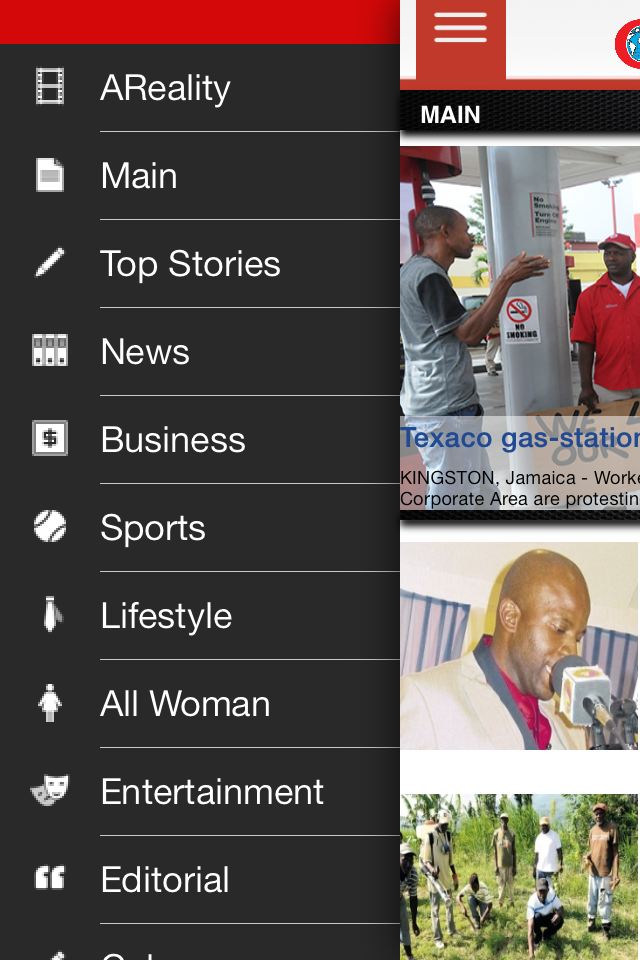
Indeed, the new app boasts a new look complete with an image for every news story, loads quickly and is interactive thanks in part to the heavily touted AReality feature. Short for augmented reality, the Observer app AReality feature pairs bonus content with print, often in the form of video.
Natalie Chin-Watkins shows off the Observer Mobile App
Chin-Watkins noted that, in the process of placing an ad, a client can say they have additional content, include the AReality logo in the ad they place and when readers scan the ad, the additional content is pushed to the device. “The really cool thing is, you don’t have to scan only from print. You could scan from a feather banner … you could scan from anything physical,” she added.
The dual benefit of this feature is marrying access to print to sustain circulation and providing additional revenues through advertising. This is in keeping with the Jamaica Observer business strategy. “One of the main focuses of the Observer is to continue to build out our print platform. So everything we do is with the print in mind,” Chin-Watkins elaborated.
Screen Grab of Jamaica Observer App
With print at its core, the newspaper has expanded to deliver content through many other platforms. Including the app, the media house boasts a new radio station - Fyah 105. Also, even more video content is expected, including weekly features thanks to the acquistion of new video equipment and studios.
The multimedia, multi platform roll out is the result of the efforts of an online team churning out content on the back end. As for the app, it was developed locally over a period of four months by developer Robert Farr. There is a Blackberry app currently in development and further updates on the way.
Until then, the app is available free in the App Store or the Android Market. When asked to comment on the level of success of the new app, Chin-Watkins happily replied, “we are seeing a lot of traction on that platform."
Each year, with the official start of the hurricane season on June 1, I dust off and update my disaster preparation plan. And updating is important, because, my how things have changed.
Back in the day, my parents told me where we would muster (such an odd word), if worst came to worst. Now, with the family so geographically dispersed, we talk about our communications plan; in effect, we lay out who will call, email, Facebook or tweet who to relay important survival information.
For Gilbert in 1988, my Mom scrambled to find a battery operated radio so that we could listen for updates on the storm. For Sandy last year I downloaded some important apps and followed prominent media houses on Twitter for my primary news and information. I tracked the storm from beginning to its bitter end on my mobile phone.
I still stock up on food and water, turn up my fridge and fill my bathtub. But these days, all of that is just as important as charging all my electronic devices (smartphone, laptop, MiFi and the like), getting a car charger (and filling my car’s gas tank so I can use it to charge) and stocking up on battery packs and spare batteries … just in case.
My important documents are still in a Ziplock® bag, but they are also digitally scanned and uploaded to the cloud. Heaven forbid the bag floats away or is lodged under a tree, I can access the documents I need from any internet enabled device.
Right after Gilbert, my neighbours and I hit the streets; in effect we went to ‘fass’ and see what damage had been done next door. These days, I turn to photo and video sharing sites to see the impact of the storm all over the world!
Frankly, I don't get the hype about the Blackberry Z10. As smartphones go, it is a perfectly adequate mobile device with all the necessary features except a physical keyboard. If you put your new Z10 down on the meeting table beside the Apple iPhone 5, the Samsung Galaxy S4 or the HTC One, would you be able to tell it apart from the field at a glance?
If you want your smartphone to stand out from the pack, consider the Blackberry Q10. Running the updated Blackberry 10.1 OS, the Q10 flaunts a physical QWERTY keyboard. For the true Blackberry loyalists, this is the Blackberry you have been waiting for!
I can tell you are excited, and you should be. But temper your excitement just a bit. The Q10 is a capable smartphone. It will do everything you NEED it to do, and it will do so, well. It will not blow your mind. Don't feel bad though, chances are it won't blow your pocket either.
The Q10 sports a square (yet another distinctive feature) 3.1" super AMOLED display with a 720 x 720 pixel resolution. It has got a micro SIM card slot, micro SD slot and a micro HDMI port. I may be wrong, but I didn't see a micro HDMI port on either the iPhone 5 or the Galaxy S4. (And cables are much more reliable that wireless technologies like AirPlay and AllShare).
You'll find front and rare facing HD cameras and a decent 1.5 GHz processor. Like it's big brother, the Q10 has all the Blackberry OS 10 popular features like my personal favourites, Time Shift, Balance and BBM Screen Share, along with the heavily touted features like Hub, BBM Video Share and Tag. Q even has some additional features like typing straight to an email from any screen.
But let's get back to what sets the Q10 apart, its remarkable Blackberry keyboard. In the few moments I was able to hold the handset, thanks to Troy Cocking at LIME, the large, tactile, keys caressed my finger tips. It was so easy to type using this physical keyboard. If you thought the keyboard on the Bold 9900 was the best keyboard on a smartphone ever, you will love the tweaks on the Q10 keyboard.
Of course, the best keyboard and good specs mean nothing if the phone freezes up like Siberia every time you try to complete a task. I didn't have enough time to put the phone through the paces myself, but I do note that I haven't heard any complaints from the early demos. Troy assures me that this new BB OS 10 is just the right type of cool.
If you are so inclined, here is the best reason to get the Blackberry Q10: it stands out and it gets the job done for likely half the price of the candybar copycats.
Certainly, I've been a Sammy fan for a long time. So, I was thrilled that Digicel would invite me to their Samsung GS4 event. It gave me an opportunity to, at least, touch the phone.
The handset goes on sale, exclusively I am told, tomorrow. And, from my 'touch' demo I can say, it's a great smart phone.
The phone is roughly the same size as the GS3, yet boasts a slightly larger screen. Samsung had to sacrifice the size of the near invisible (or maybe the launch event at CRU was just dark) Menu and Return buttons.
I like the rounded square edges and the sturdier feel of the construction. The SG4 doesn't feel like a piece of cheap plastic, but it doesn't feel quite as sturdy as the iPhone.
As expected, the screen looks great and is ridiculously responsive. Navigation was effortless. With the low light and the high background noise, I was unable to try out features like the air gestures or S Voice.
As for the air gestures, I heard from a couple attendees (in Digicel branded shirts) that they work like a charm. The same folks told me that the previous non-functioning (practically speaking) S Voice was much improved.
The Dual Shot feature on the camera was cool, but, I wonder, would we get bored of it by next week. Hmm. The camera has a lot of new and upgraded features to explore.
I like the slightly enhanced icons, the S Health looks cool, the screen mirror looks useful, the IR remote I hope works and the upgraded All Share looks like fun.
The Samsung Hub left me feeling like it was completely unnecessary. So too did the typing, just like the SG3. I don't find the keyboard easy to use or insightful.
But, the feature that has me thinking 'I like this phone' is the Safety Assistance ... a feature I hope I never need but glad I have.
Beyond that, this new Sammy has so many features crammed into one mobile device, that its hard to want anything else. I'm told the bigger battery and the improved OS make it run faster for longer on one charge. I will try to confirm that if I ever get a road test model.
If money was no object, I would buy this computer masquerading as a phone in half a heart beat. If you have the S2, time to ditch and move up. If you've got an S3 and you're tapping it out, time to upgrade. If you're a poser that is rich and likes to have the latest, time to upgrade.
If you're a student, fixed income professional, unemployed loafer, tech newb or person who actually uses a phone primarily for making calls (amazing), you may want to wait for my final review after the price check.
Sammy wasn’t just any smart phone, he was my constant companion.
I sought out the best care I could find for Sammy and he tried valiantly to return to his former greatness, even after many technicians said his days were numbered. When I shared news of Sammy’s ultimate demise with Digicel, his parents, they too were devastated. After all, he was irreplaceable.
During Sammy’s four short months in my hands, he had a tremendous impact on my life; most significantly, Sammy’s 8 megapixel camera helped me document and share the growth of my beautiful baby boy. The high-resolution images and video displayed brilliantly on the 4.8-inch Super AMOLED display. The images also helped distant relatives feel connected while tugging my heartstrings every time I showed the albums to friends and well-wishers.
Of course, Sammy’s impact was equally profound at work. The S Calendar, Contacts and Voice Recorder apps were constantly accessed. It seemed that Evernote never had a chance to close when it was right there at my fingertips thanks to Sammy, and when combined with S Note, I never felt helpless without at pen.
With Sammy gone, I must wait until I get to my desk to check my email or chat on Google Talk. He was gone before we had a chance to experiment with AllShare Play; I am sure my iPad is happy about not having the competition.
Co-workers and associates will tell you that Sammy made me look good! With apps like TeamViewer, Dropbox and Skype I could turn any location on the planet with an internet connection into an office. And I could find any location on earth with Google Maps.
Speaking of travel, Sammy’s Bluetooth integration with my SUV, allowed me to drive hands free; so cool.
I never had a dull moment with Sammy. I listened to music on my phone, on my micro 32 GB micro SD card and streamed over the internet. I listened to FM radio, recorded interviews and even shared clips with clients on the fly. I read all my favourite magazines and websites on Flipboard, caught up on all the latest news with a slew of apps from BBC, CNN and USA Today. I got lost in my favourite games including Temple Run. I am going to miss watching (and sometimes uploading) my favourite videos to YouTube.
Amazon is going to miss Sammy too. Amazon and Sammy served up the Amazon App, Audible and my personal favourite, Kindle.
Sammy was very sociable. He was friends with Whatsapp, Twitter, Facebook, Pinterest, Instagram and LinkedIn. He made new friends with phone calls. And, he would share his internet connect with anyone near by, by converting his 4G signal into a WiFi Hot Spot.
We did so much together. Sammy and I would browse all day through local news sites that didn’t have native apps. Sammy and my son had fun together too. He had his own screen full of kid-friendly learning and gaming apps.
Sure, S Voice is no Siri and sure Sammy couldn’t go half a day without being tethered to a power source, but that is only because he worked so hard and did so much. He did what he did with style; he was sleek and thin.
His Bible app comforted me in my darkest hours and every hour I needed to reach for the scripture. Sammy wasn’t just any smart phone, he was my constant companion. Yes. Sammy will be missed. But his data lives on. Thank you Lord, for back ups.
In simple terms, Worldwide Interoperability for Microwave Access or WiMAX, means wireless broadband. Imagine if you will, a giant hotspot right across the island with high-speed Internet access. That’s WiMAX.
WiMAX offers speeds comparable to DSL and cable with download speeds of up to 10 Mbps. It also offers comparable reliability and accessibility. But, that is where the similarities end.
Notably, WiMAX is consumer installed. Pick up a WiMAX modem from the local mobile or computer store, plug it in and it is installed. No CDs, software drivers or technicians necessary to get the service up and running in minutes.
Because WiMAX by definition is wireless, no landlines or hardwire installations are needed. That means, no wait times, no need to have strangers visit your home and no ugly cables running all over the house.
Thousands of towers have been upgraded to facilitate island wide wireless broadband making the service readily accessible to most Jamaicans living in populated areas. The wireless 4G signal is available in many locations where cable and DSL are not available.
WiMAX really sets itself apart from hardwire Internet options with its mobility. With a USB dongle, WiMAX users can take the high-speed Internet on the road.
Of course, WiMAX wouldn’t be a practical option if not comparable on cost, which it is. Both pre and post-paid plans offer unlimited data transfer with competitive fees.
All in all, WiMAX is fast, reliable, mobile, easy and cheap, like the Internet should be.
When the realisation dawns on you that all your contacts, pictures and emails are gone, it can be devastating. Admit it, our phones are an integral part of our lives. Personally, I can't even remember what life was like before the BlackBerry phone. But it is not the phone that is so important, it's the information contained within that is truly part of the fabric of our lives.
Yet, we treat our phone with such scant regard. We leave them at the bank, the restaurant and our friends' house. We keep them out in the open and thieves steal them. We simply forget where they are. Fortunately for us, technology can find our phones for us.